Icon of program: Wallpaper Slideshow LT

Wallpaper Slideshow LT for Windows

  • Free
  • 3.1
    13
  • 16.6K
  • V1.8.0
Free Download for Windows

View an ad to download for free

Automated wallpaper slideshow for Windows desktops

Wallpaper Slideshow LT from gPhotoShow.com is a freeware slideshow utility that automates desktop background rotation for Windows users. The app cycles images at user-defined intervals, supports random or sequential play, and uses bicubic image resizing to fit varied screen resolutions while preserving photo orientation. It handles unlimited images across folders, offers multi-monitor assignment and system tray access. The tool suits Windows desktop users who want a low-maintenance way to display personal photo collections.

Top Recommended Alternative
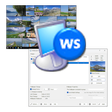
What does Wallpaper Slideshow LT change on the desktop?

The app replaces a static wallpaper with an automated slideshow drawn from local photo folders. It supports common image formats, including:

  • JPG
  • GIF
  • PNG
  • TIF
  • BMP
Unicode support lets the slideshow use files and folders named in any language, and the program can hide desktop icons to present a cleaner background.

How much can you customize the slideshow?

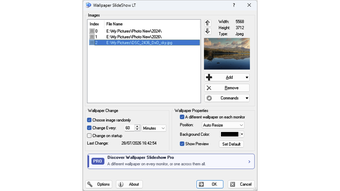
Control covers sequencing, timing and how images fit the screen. Users set time intervals, choose random or sequential display modes, and point the app at unlimited folders and subfolders. Built-in bicubic filters resize images for different resolutions, and EXIF tag awareness ensures photos rotate to their recorded orientation instead of appearing sideways.

Does it affect system performance or run continuously in the background?

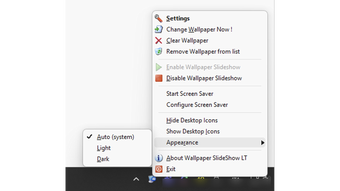
The tool is designed to run with a very small resource footprint while staying available in the tray. The developer describes it as having extremely low system resource consumption, and the program places a tray icon for quick manual changes without opening the main window. That background presence keeps the slideshow active without a heavy persistent process.

Is it easy to set up and does it work across multiple monitors?

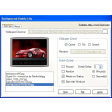
Setup is straightforward for users who manage local photo libraries, and multi-monitor behaviour is explicit. The app assigns different wallpapers per monitor or spans a single image across screens. Unicode filename handling reduces configuration errors with non-Latin text, and a simple interface exposes folder selection, per-monitor choices and icon-hiding without deep technical steps. Supported platform range covers recent Windows releases.

Best for Windows users who want low-effort photo slideshows

Wallpaper Slideshow LT is a practical choice for desktop users who value automated, low-overhead wallpaper rotation and simple daily use, backed by a developer experienced in personalization utilities. For a smoother routine, enable the option that changes wallpaper at Windows startup and keep a small, curated folder of images so each session shows only preferred photos.

  • Pros

    • Per-monitor assignments for independent wallpapers
    • Bicubic resizing for high-quality image fitting
    • EXIF-aware rotation preserves photo orientation
    • Unicode support handles non-Latin filenames reliably
  • Cons

    • Windows-only platform support
    • No native support for video-format wallpaper files
 0/2

App specs

  • Developer

  • License

    Free

  • Version

    1.8.0
  • Latest update

  • Platform

    Windows

  • OS

    Windows 11

  • Language

    English

  • Downloads

    16.6K

    Last month's downloads

    • 30
  • Size

    6.34 MB


Icon of program: Wallpaper Slideshow LT

Wallpaper Slideshow LT for PC

  • Free
  • 3.1
    13
  • 16.6K
  • V1.8.0
Free Download for PC

View an ad to download for free


User reviews about Wallpaper Slideshow LT

Have you tried Wallpaper Slideshow LT? Be the first to leave your opinion!

Add review

You may also like

Alternatives to Wallpaper Slideshow LT

Explore Apps

Latest articles

Laws concerning the use of this software vary from country to country. We do not encourage or condone the use of this program if it is in violation of these laws.

Softonic

Is Wallpaper Slideshow LT safe?

100/100

Score result: Clean

This file passed a comprehensive security scan using VirusTotal technology. It is safe to download.

  • Virus free
  • Spyware free
  • Malware free
  • Verified by Security Partners

    VirusTotal logo

Scan Info

Last scan
Tuesday, August 4, 2026
Scan provider
VirusTotal · Full report

File Integrity

File
1785268867382-488657610-WallpaperSSLT.exe
SHA256
f8458f90e883574f2e77a635616113d6cd492e9e0bef23c00f56f0cc44080da4
SHA1
98fb87e0632e5fb9d3121b5ffed1ed7a10268749

Softonic security commitment

Wallpaper Slideshow LT has been thoroughly scanned by our advanced security systems and verified by industry-leading partners. This file comes from the official developer and has passed all our security checks, showing no signs of viruses, malware, or spyware. For more information, visit our Security and Trust Center

Softonic

What is a Validated Developer?

Validated Dev

This badge indicates that Softonic has received authorization to offer the software from the developer or a designated representative, through the Softonic Publisher Center or other agreements. Content, ownership and compliance are responsibility of the developer.

More details in terms and conditions.

Are you a developer?

Join the Softonic Publishing Center and reach millions of users.

Not a developer?

Signed in to Softonic as